Amazon Brand Analytics: The Click Is Yours, the Sale Is Theirs

TL;DR
How to read Amazon Brand Analytics for two different problems: search terms your listing is missing, and terms where a competitor converts your clicks better.
✨ AI-assisted research, automated editorial review by Avanta Global EOOD. Learn more
Brand Analytics is the most useful report a brand-registered Amazon seller gets for free, and one of the least read. Every week it lists the search terms shoppers typed, and for each term the three products that got the most clicks, with each one's click share and conversion share. Most sellers open it once, scroll a list of thousands of terms, and close it.
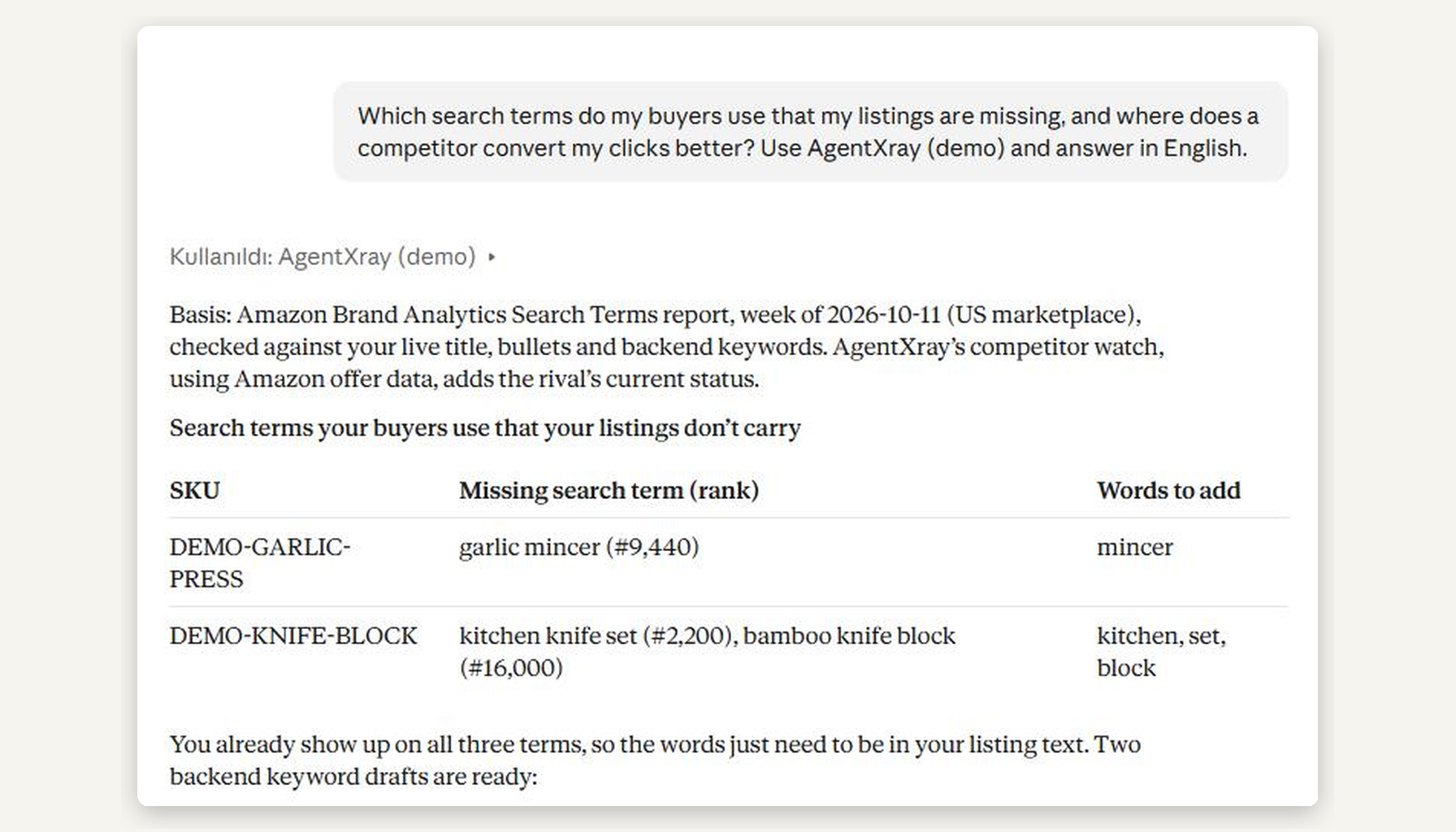
The trick is that the report answers two different questions, and they need two different fixes. This post shows both on a real conversation: Claude, connected read-only to AgentXray's public demo store, asked one question. Every number below comes from that demo store, a synthetic US seller, on 23 October 2026. None of it is a real account.
The question
Which search terms do my buyers use that my listings are missing, and where does a competitor convert my clicks better?
Claude called AgentXray's Brand Analytics tools, checked the result against the live listing text, and answered in a table. The answer names its basis first: the Search Terms report for the week of 2026-10-11, checked against the live title, bullets and backend keywords.
Problem one: your buyers use words your listing does not carry
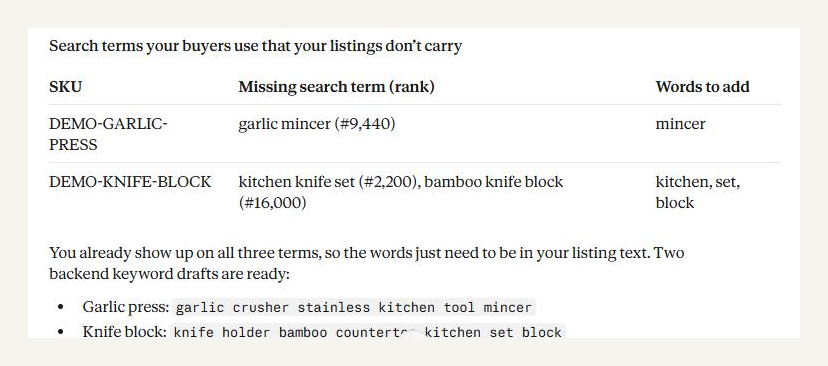
Two products in the demo store show up in the top three clicked for terms their own listing text does not contain:
| Product | Missing search term (weekly rank) | Words to add |
|---|---|---|
| Garlic press | garlic mincer (#9,440) | mincer |
| Knife block | kitchen knife set (#2,200), bamboo knife block (#16,000) | kitchen, set, block |
This is the cheap problem. Shoppers already click these products for these terms, so Amazon already connects them; the listing simply does not say the word. Adding it to the backend keywords is a minute of work.
Two details matter more than the list itself:
- Only each product's own terms. A term is drafted for a product only when that product is the one in the top three for it. The garlic press never gets "bamboo" because the knife block ranks for it. A wrong backend keyword does damage nobody sees, so the wider list is reported but never drafted.
- A draft replaces the whole field. Amazon's backend keyword field is one string. The drafts Claude showed keep the existing words and add the missing ones; nothing is sent to Amazon until the seller approves the draft in the browser.
Problem two: you get the click, they get the sale
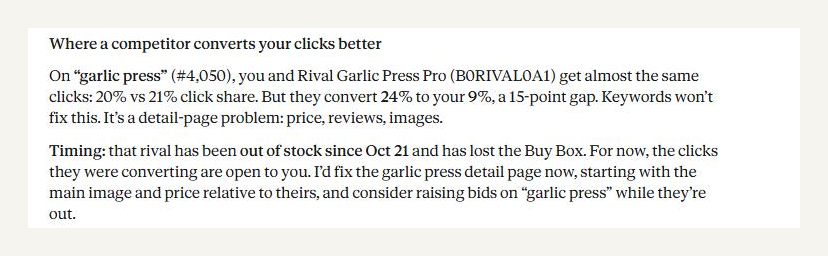
The second half of the answer is the one that changes what you do next. On "garlic press" (weekly rank #4,050), the demo store and a rival get almost the same clicks: 20% vs 21% click share. But the rival converts 24% of those clicks and the demo store converts 9%. That is a 15-point gap.
No keyword fixes this. The shopper already searched, already clicked, already landed on the page, and then bought the other product. It is a detail-page problem: price, reviews, images, the main image above all. Treating it as a keyword problem (more bids, more terms) buys more of the clicks that are already not converting.
Then Claude added the part a weekly report cannot: AgentXray's competitor watch, which reads Amazon's offer data, showed the rival had been out of stock since 21 October and had lost the Buy Box. For as long as that lasts, the clicks the rival was converting have nowhere to go. Claude's advice: fix the garlic press detail page now, starting with the main image and price, and consider raising bids on "garlic press" while the rival is out.
What the data does not cover
Claude ended with what it could not see, because the tool returns those limits with the numbers:
- Terms where none of your products is in the top three clicked are not in the report at all. Brand Analytics does not report share outside the top three.
- Only terms tied to your own buyers were drafted.
- The rival's price, rating and review count were not read, so it could not say which of them drives the higher conversion.
That last line is the honest one. A conversion gap tells you where to look, not what is wrong.
Doing this on your own store
The same question works on any brand-registered seller account connected to AgentXray, in Claude or ChatGPT. The tools behind this answer are get_brand_keyword_gaps, get_search_term_history (weekly rank and your shares over time) and get_competitors (Buy Box, offers and stock-outs on the ASINs you watch). They are listed with sample answers in the MCP tool reference.
- Connect Claude or connect ChatGPT to your Seller Central account.
- Or try it first on the read-only demo store: the consent screen offers "connect the demo store instead", and nothing of yours is connected.
- How AgentXray compares with Amazon's own MCP servers: Amazon MCP servers, compared.
FAQ
What is conversion share in Amazon Brand Analytics?
For each search term, Brand Analytics lists the three most-clicked products and, for each, its share of the term's clicks and its share of the term's purchases. When a product's click share is close to a rival's but its conversion share is much lower, shoppers are choosing the rival after seeing both pages.
Is a conversion gap a keyword problem?
No. The shopper already found and clicked your product. Adding keywords or raising bids buys more of the same clicks. The fix is on the detail page: price, reviews, images and the main image in particular.
Who can use Brand Analytics?
Sellers enrolled in Amazon Brand Registry. Without Brand Registry, the Search Terms report is not available and these tools say so instead of answering.
Does the AI change my listing?
Not on its own. A connection that may draft can prepare a backend keyword change; it waits in AgentXray until you approve it in your browser. A read-only connection, like the one used for this post, cannot draft at all.
About this article
This article was researched and drafted with AI assistance. Before publication, it passed automated editorial review against Avanta Global EOOD's published editorial standards (factual accuracy, source attribution, voice & readability). Our editorial standards page documents exactly what we check. We continuously monitor published content for accuracy and update articles when new information emerges. Learn more about our editorial process and the team behind AgentXray.